
One of the technology pioneers, Yahoo rolled out an update to their Yahoo Multiple mailbox feature (both Mail App and the web version) adding support for Gmail and Google Apps Accounts. You might already know that Yahoo supportsmultiple mail services and Social accounts integration already in their mail. Recently they also redesigned the Yahoo mobile App. With the addition of Gmail, Yahoo multiple mailbox now supports four email services namely Yahoo, AOL, Outlook, and Gmail.
 Confirming the same thing, Yahoo said,
“All the features you need and love in Yahoo Mail – powerful search, smart contacts, rich compose features and Yahoo Account Key for password-free sign-in – are now available with Gmail. Here’s your path to a more convenient, powerful and personal email experience. You can now search across your entire history of emails, from day one, for all connected mailboxes! (Not just your most recent emails, which is how it’s done in many apps today).”
The company also claims that this integration would bring all your mails under one roof starting from day 1, not just recent emails, which is what other mail apps do.
Below video illustrates the update:
“All the features you need and love in Yahoo Mail – powerful search, smart contacts, rich compose features and Yahoo Account Key for password-free sign-in – are now available with Gmail. Here’s your path to a more convenient, powerful and personal email experience. You can now search across your entire history of emails, from day one, for all connected mailboxes! (Not just your most recent emails, which is how it’s done in many apps today).”
How to Set Up Gmail Account in Yahoo multiple mailbox
The procedure is fairly simple. To add you Gmail Account to Yahoo mail, navigate to settings-> Accounts->Add mailbox and select a service you want to integrate (I used Google here).
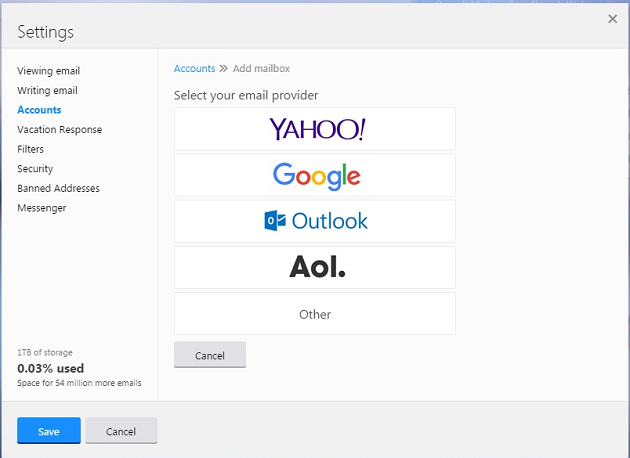 Fill in your Gmail account username and you will be navigated to Google account login page. Give in your credentials, and allow Yahoo to access your information. Then you will be redirected back to Yahoo Page. You would see something like below screenshots:
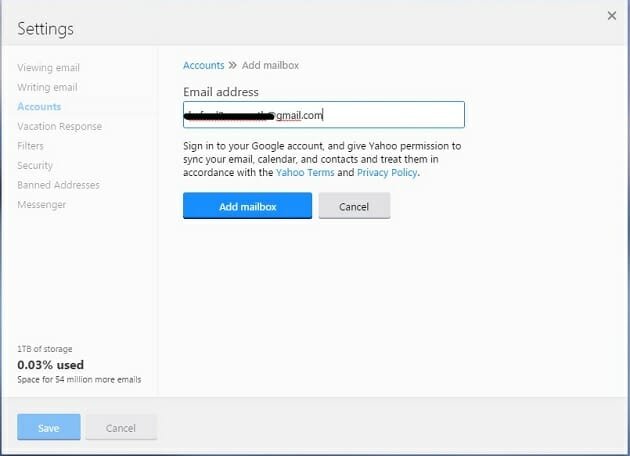
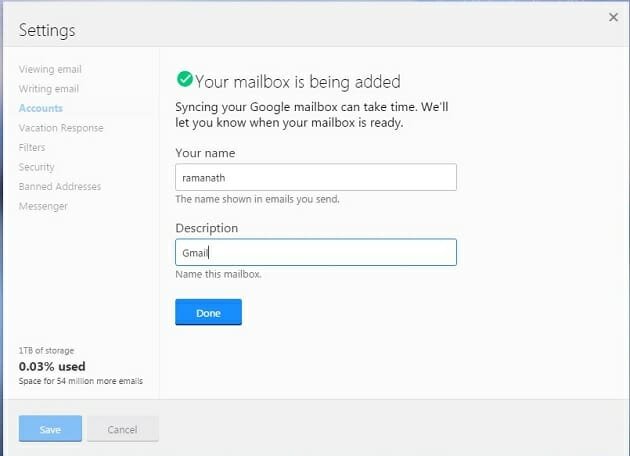 Soon all your Gmail information would get synced to your Yahoo account. You can also follow the similar procedure for Android or iOS devices.
I use Gmail, What Do I get by Integrating My Account with Yahoo?
Yahoo multiple mailbox becomes very much handy when you want to manage all your accounts from one place. All the mails integrated will come along with native features of Yahoo Mail. If you are a frequent user of Yahoo mail you would get extra benefit by adding your another email address by another service provider. Even though you don’t use Yahoo mail that much, you can try using it because of following interesting features that Yahoo offers.
Signing in Without Password
Yahoo always trying to make Account sign-ins without password and introduced couple of other ways to it’s users such as On-Demand Passwords and Yahoo Account Key (for mobile users). These are very nice features because these days we use lot of web services and have to use many passwords. You can activate these features from Yahoo settings which would let you login without remembering complex passwords.
Searching Capabilities
Yahoo provides advanced searching abilities with wide range of options. Even though Gmail has advanced searching filters, Yahoo has it’s own search interface. This is one of the nice features that Yahoo provides to it’s users. There are plenty of search options and filters that are available to search and results will get displayed with isolated file types to pick the result you wanted very easily.
Example
I searched emails from Facebook in my account and got below results:
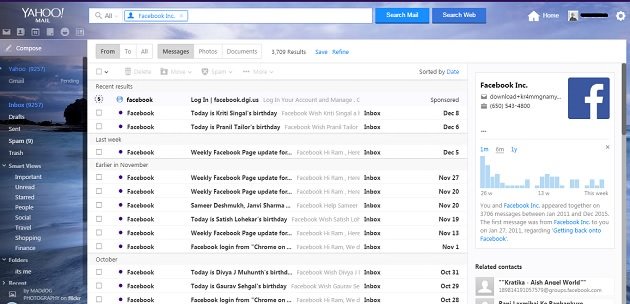 As you can see, in a single window, the results would appear in different categories as
- From
- To
- All
- Messages
- Photos
- Documents
You can also sort the results by date, old and new and Attachments. On the right side, you would see how long Facebook and me got connected and how many conversations took place between us. These features also work for your Gmail emails.
Integration of Contacts
When you include Gmail to your Yahoo mail, automatically Contacts would also get synced. You can also import Facebook contacts to your email. So, if you integrate your social accounts and other email accounts to Yahoo, all of your contacts would be at one place to manage. Yahoo also shows suggestions based on how frequent you interact with someone while composing an email.
Other Yahoo Native Features
Along with above features, you would also get native features of Yahoo Mail such as Notes – using which you can scribble something while browsing your mails, Yahoo messenger, a dedicated Yahoo news feed within mail which displays current updates in different categories such as – All stories, News, Finance, Entertainment, Sports, Technology, Science and Lifestyles. You can turn on/off breaking news alert. You can also email an item to your friends if you want to.
Do let us know what do you think of this update in comments section below.


No comments:
Write comments